
 Back to Blog
Beyond Text: How We Made RAG Generate Intelligent User Interfaces
What if your chatbot didn't just answer questions but knew exactly how to display the answer?
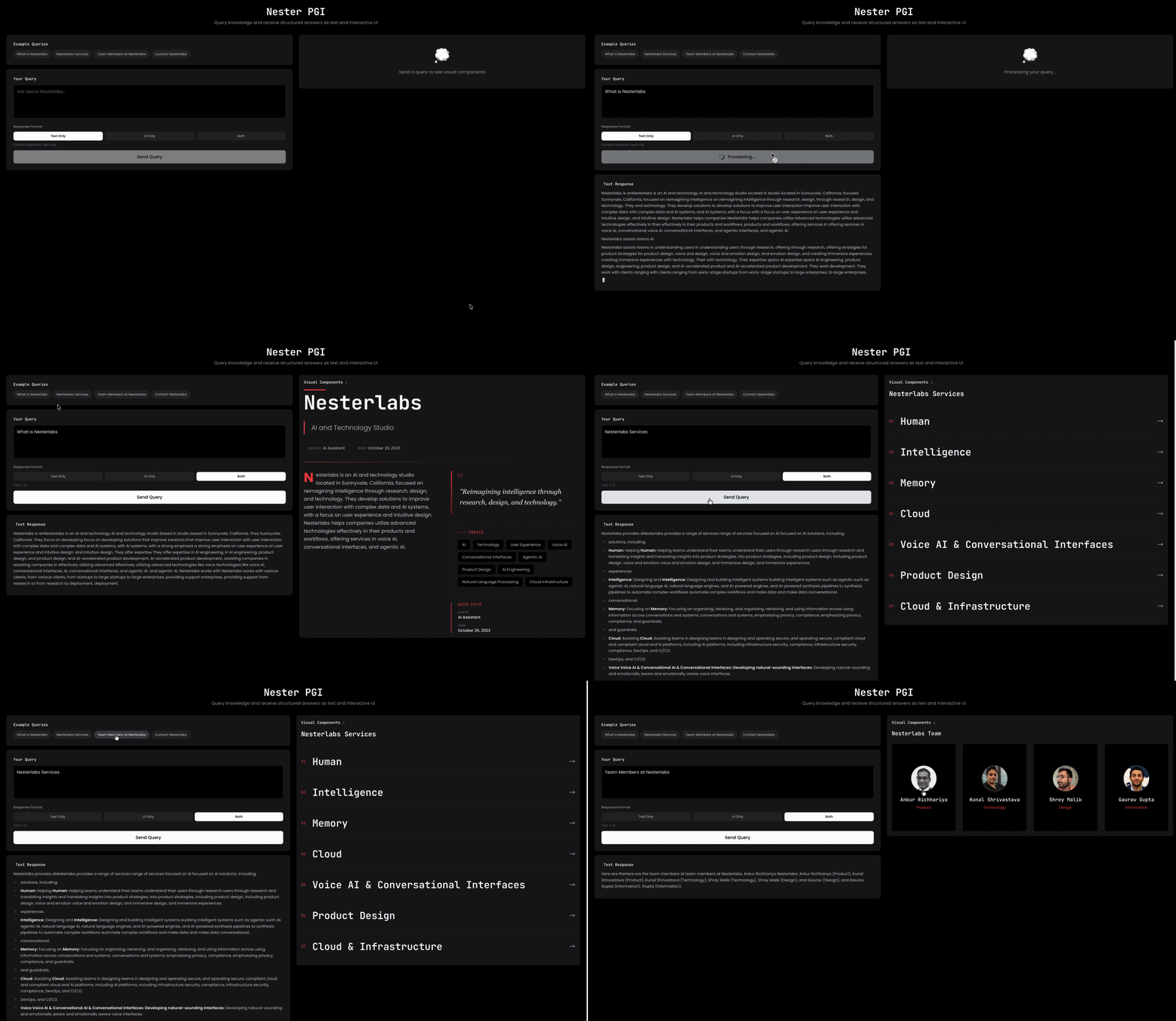
The Question That Started Everything
At Nesterlabs, we have been deep in the RAG (Retrieval Augmented Generation) space for a while. RAG is powerful - it grounds LLM responses in real knowledge, reduces hallucinations, and makes AI actually useful for enterprise data.
But we kept bumping into the same friction.
A user asks: "Show me our sales performance this quarter."
RAG retrieves the data. The LLM crafts a perfectly accurate response. And then... it spits out a wall of text. Numbers. Bullet points. Maybe some markdown formatting if you're lucky.
The user wanted a dashboard. They got a paragraph.
This kept nagging at us. If RAG is intelligent enough to retrieve the right knowledge, why is it not intelligent enough to display it the right way?
The Insight: Intent Isn't Just About What, It's About How
Here's what we realized: every query carries two signals.
- Data intent: What information does the user want?
- Display intent: How do they expect to see it?
Traditional RAG systems only address the first. The second gets punted to frontend developers who manually build dashboards, charts, and cards after the fact.
But look at how humans naturally phrase questions:
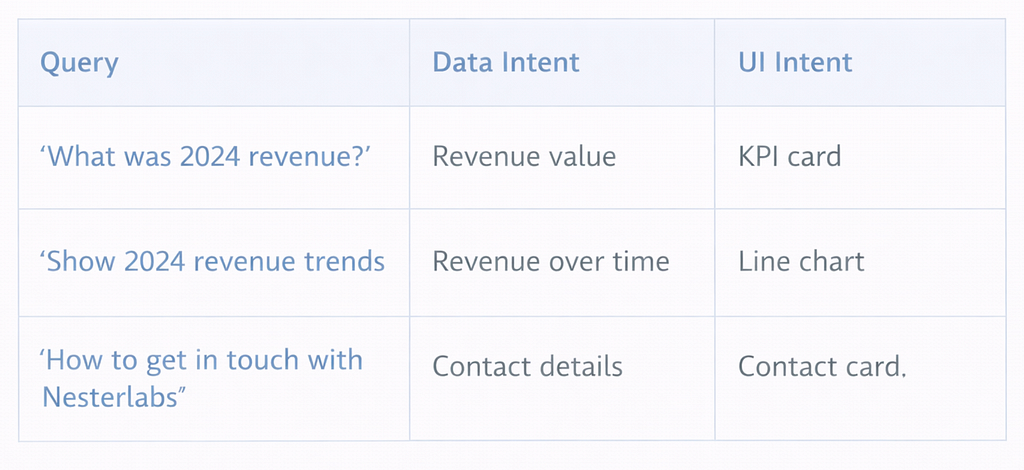
The display intent is already embedded in the language. We just weren't listening to it.
So we asked: What if the system could detect both intents and generate not just the answer, but the right UI to display it?
Enter Progressively Generated Interfaces (PGI)
We call this concept Progressively Generated Interfaces - the idea that if knowledge retrieval can be intelligent, UI generation can be too.
Instead of locking responses into fixed templates or dumping everything as text, PGI dynamically assembles the right interface based on what the user is actually asking for.
This isn't about making chatbots prettier. It's about collapsing the entire frontend development cycle for knowledge-driven applications.
Ask a question. Get a production-ready UI. In seconds.
How We Built It: System Architecture
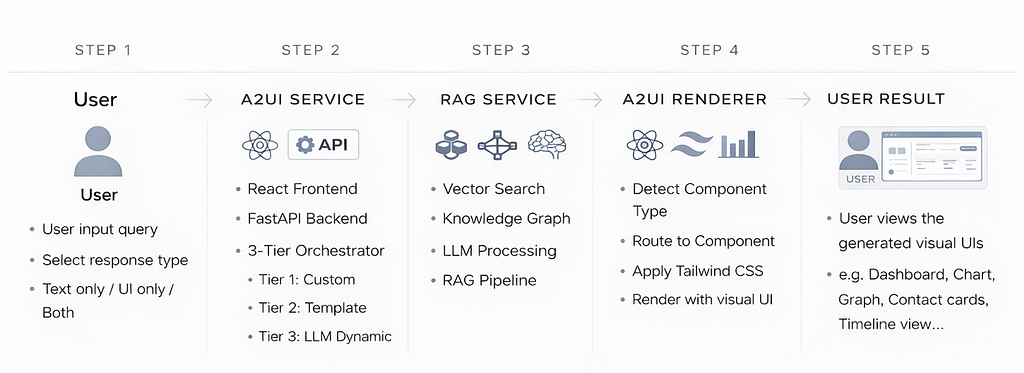
The system follows a 5-step pipeline. Let me walk through each component.
Step 1: User Input Layer
The user submits a query through the React frontend and selects a response type: text only, UI only, or both. This flexibility matters - sometimes you just want a quick text answer, other times you need a full visual breakdown.
Step 2: A2UI Service
This is the orchestration layer. It runs on a FastAPI backend and houses the 3-Tier Orchestrator - the decision engine that determines how to render the response.
Tier 1: Custom Templates - For cases where you need pixel-perfect control. Your company has a branded dashboard layout, your product pages follow a specific structure - you define custom templates and reference them directly.
Tier 2: Semantic Template Matching - This is where the intelligence lives. Most queries don't map to a predefined template. Instead of brittle keyword matching, we use semantic understanding - the system grasps the meaning of the query and matches it to the most appropriate UI pattern.
Under the hood, we use a hybrid approach:
- Fast keyword snapping for obvious terms ("team" to team grid, "pricing" to pricing table)
- Embedding-based semantic matching for everything else - even phrasings the system has never seen before
A user asking "How to get in touch with Nesterlabs?" gets routed to a contact card, even though the word "contact" never appeared in the query.
Tier 3: LLM Dynamic Fallback - What happens when a query is truly novel and nothing matches? Instead of failing or falling back to plain text, we let the LLM propose a custom layout - sections, cards, media blocks - that our renderer can interpret generically.
This ensures the system never dead-ends. Every query gets a structured, visual response.
Step 3: RAG Service
The knowledge retrieval layer. This is where we fetch the actual data to populate the UI. It combines:
- Vector Search: Semantic retrieval from your document corpus
- Knowledge Graph: Structured relationships between entities
- LLM Processing: Reasoning over retrieved context
- RAG Pipeline: The full retrieval-augmented generation flow
The RAG service is modular. It can pull from direct database queries, REST APIs, real-time data streams, or third-party SaaS integrations. The input is always structured data + user intent.
Step 4: A2UI Renderer
Once we have the data and know which UI pattern to use, the renderer takes over:
- Detect Component Type: Based on the orchestrator's decision
- Route to Component: Select the appropriate React component
- Apply Tailwind CSS: Style consistently
- Render with Visual UI: Output the final interface
We built on Google's A2UI (Adaptive UI) specification - an open standard for describing user interfaces as structured data instead of code. Think of A2UI as JSON for UIs. Instead of writing React components, you describe what the interface should look like in a simple data structure. The renderer handles the rest.
This gave us portability (works across web, mobile, embedded), speed (no transpilation, no build step), and extensibility (adding new UI patterns doesn't require core code changes).
Step 5: User Result
The user sees the generated visual UI - dashboards, charts, graphs, contact cards, timeline views - whatever best fits their query. End-to-end latency: 4-6 seconds.
What This Changes
Let's be concrete about the shift:
Before: User asks a question → RAG retrieves knowledge → LLM generates text → Frontend team builds a dashboard → User finally sees something useful (days or weeks later)
After: User asks a question → System retrieves knowledge + detects display intent → UI renders automatically (4-6 seconds)
For teams building knowledge-driven products - internal tools, customer-facing portals, analytics dashboards - this compresses weeks of frontend work into a single API call.
One endpoint. Text, UI, or Both. Adaptive to the query.
Where We're Headed
Today: We solved the template detection problem, and it's not based on keyword matching. Our 3-tier orchestrator understands what you're asking, then picks the best layout from our template library. If nothing matches, the LLM creates a new layout instantly. So even if we've never seen that kind of query before, it can still show the right structure.
The main idea is simple: it understands what type of answer you need and presents it in the clearest way.
Tomorrow: The system becomes smarter and more personal over time. It learns which layouts each user prefers, so the same question can look different for different people. It also adapts to where you're viewing it - like a full dashboard on desktop, quick cards on mobile, spoken metrics on voice, or a clean snapshot in email. Teams will be able to share and reuse templates, and the system can even mix layouts together when needed, like putting a comparison chart inside a timeline. On top of that, it can guide you by suggesting the best format and helping you refine results, like filtering large datasets to the top 10.
Our bet is that the systems which figure out how to deliver both intelligently will define the next generation of knowledge interfaces.
We're calling it Nester PGI for now. But really, it's just the obvious next step: if retrieval can be smart, rendering should be too.